A powerful tool to identify which extension is causing issues in your VS Code setup.
Found an interesting VS Code feature: Extension Bisect. It helps you find out which extension is causing problems in your VS Code environment using binary search. This is especially useful when you have many extensions installed and are experiencing performance issues, crashes, or other unexpected behavior.
Figure: VS Code's Extension Bisect disables half of the installed extensions at a time to narrow down which one is causing the issue.
A creative architecture for building desktop applications with shorter delivery time for a certain class of desktop tools.
Recently got a new way to build desktop applications. This is not a typical Qt desktop application. The core idea is:
BE: local FastAPI backend service
FE: Web pages with HTML, CSS, and JavaScript
Shell: open it inside pywebview to make it a desktop app.
The interesting part is that this is still a real installable desktop application, not “just a website in a browser”. In practice, the release pipeline can use:
"Try-catch should never replace proper control flow. Don’t use it to handle null references or check for empty lists. It’s not meant for regular logic — it’s meant for unpredictable failures like file I/O, networking, reflection, or untrusted input."
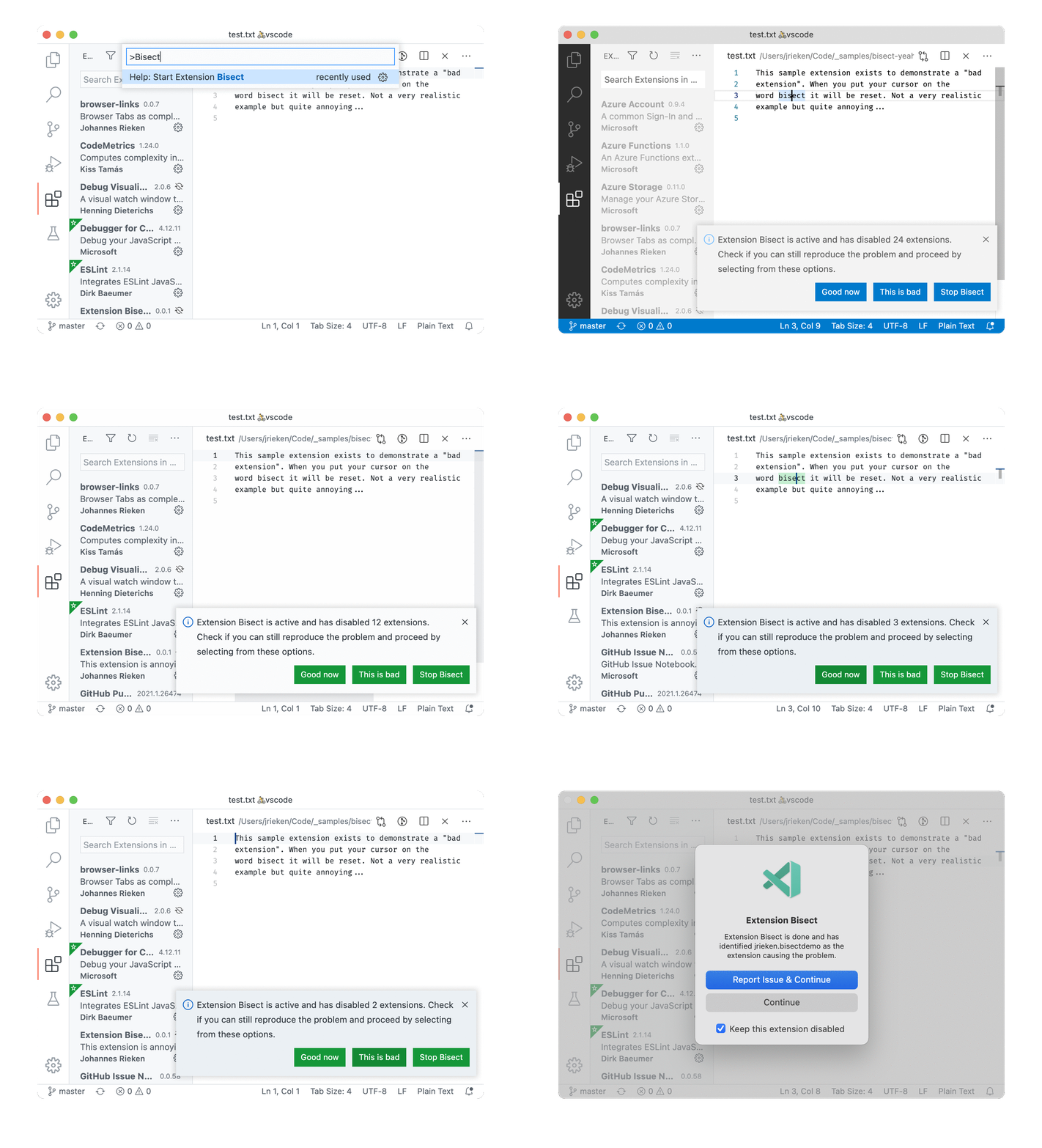 Figure: VS Code's Extension Bisect disables half of the installed extensions at a time to narrow down which one is causing the issue.