Last week, in a conversation with friends, we brought up some conversations about this "tech blog". I tried to explain my original intention of this blog:
The best way to learn is to teach. I am used to imagine I am preparing a lecture to teach my students. Thus, I need to try to explain the knowledge in a clear and organized way. And if there is a chance to teach, I will be confident to share my blog with my students as a good reference.
The palest ink is better than the best memory. The knowledge system will help me to quickly recall the knowledge I have learned, like a dictionary. Or, lazy me treats this blog as my second brain.
Confucius said: "I reflect on myself three times a day." In the era of AI explosion, keep learning and reflecting is the only way to keep up with the fast changing world. This blog is the best inspiration Dojo to polish my mind and keep me thinking.
Open source is the best way to share knowledge. As a developer, engineer, or human, I hope my blog can help more people to learn and grow together. I would love to contribute to the human knowledge system and make the world a better place.
However, even though with above bullets, I still feel like I am not fully satisfied how to introduce my blog the best and most effective way.
More secure way to deploy GitHub Page with repo in resource-public.
With the security concerns of exposing source Markdown files and Git history, I recently switched my previous public GitHub Pages repository to a private source repository, which will only be responsible for building and deploying to a separate public repository.
Let's check the best practices for this private-to-public deployment setup!
Let's take my old mkdown blog repo ytianle.github.io as an example, which was public and contained both the MkDocs source files and the generated static site. This meant that anyone could view the Markdown sources, commit history, and author information directly on GitHub.
Public repo (old):ytianle.github.io (public, contains both source and generated files)
A powerful tool to identify which extension is causing issues in your VS Code setup.
Found an interesting VS Code feature: Extension Bisect. It helps you find out which extension is causing problems in your VS Code environment using binary search. This is especially useful when you have many extensions installed and are experiencing performance issues, crashes, or other unexpected behavior.
Figure: VS Code's Extension Bisect disables half of the installed extensions at a time to narrow down which one is causing the issue.
A creative architecture for building desktop applications with shorter delivery time for a certain class of desktop tools.
Recently got a new way to build desktop applications. This is not a typical Qt desktop application. The core idea is:
BE: local FastAPI backend service
FE: Web pages with HTML, CSS, and JavaScript
Shell: open it inside pywebview to make it a desktop app.
The interesting part is that this is still a real installable desktop application, not “just a website in a browser”. In practice, the release pipeline can use:
"Try-catch should never replace proper control flow. Don’t use it to handle null references or check for empty lists. It’s not meant for regular logic — it’s meant for unpredictable failures like file I/O, networking, reflection, or untrusted input."

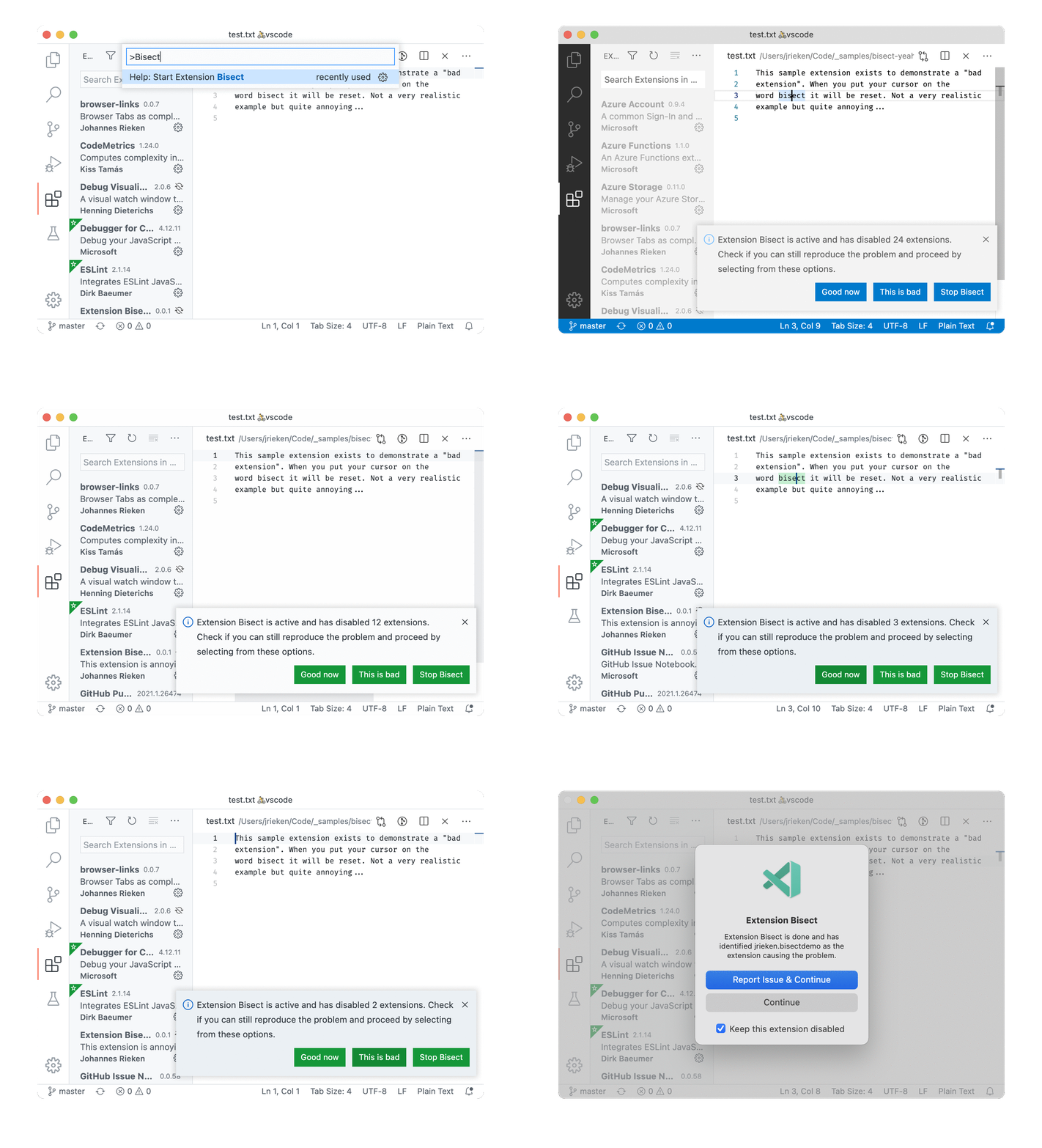 Figure: